This guide explains how to set up a multi-buy promotion where a discount is applied when the customer purchases multiple items within a defined category. In this example, the customer receives 20% off jerseys when buying two or more.
Setup Steps
1. Go to Promotions
- Navigate to Orders in the sidebar
- Click Promotions
- Click the Create button
- Select Multi-buy / Mix & Match discount as the campaign type
2. Fill in Campaign Details
| Field | Value |
|---|---|
| Name | 20% off jerseys when buying 2 or more |
| Valid from / until | Select a from date and to date |
| Priority | 10 |
| Can be combined | Off (disabled) |
| Always apply | Off (disabled) |
| Customer club | Off (disabled) |
| Markets | Norge, English |
Optional: Set filters for Customer groups, Stores, or Order types if needed.
3. Define the Scope (Promotion Tab)
- Category:
- Selected:
Jersey - Required categories: Leave empty
- Excluded categories: Leave empty
- Selected:
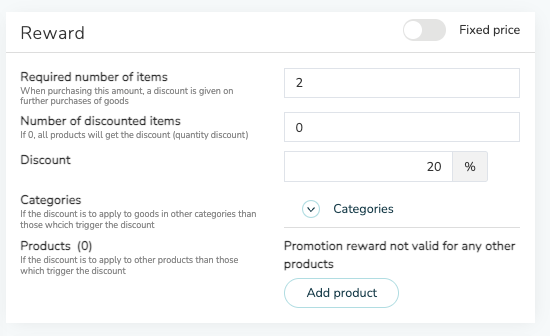
4. Configure the Reward
How It Works
- When the customer adds 2 or more jerseys to the cart, all qualifying items receive a 20% discount.
- If only one jersey is added, no discount is applied.
- The promotion only affects products in the "Jersey" category.
Recommendation
We recommend setting up and testing the campaign in a test environment before publishing it to production. This ensures the logic and discount application work as expected.